Nannies - who drove a 2026 car and can tell?

Foxy87

Emira Fiend
Joined
Mar 20, 2023
Messages
510
Media
54
Reaction score
446
Status:
Emira Owner
My Specs:
Emira V6
Hey

I will get my Emira supposably in April/May. I didnt spec the „extended co drivers package“ (its an option in europe) but will have the co driver package as standard which includes the following nannies:

- Autonomous Emergency Braking (AEB)
- Traffic sign recognition
- Blind spot warning system
- Lane change assist
- Lane departure warning
- Fatigue detection/warning

I am very curious how Lotus implemented these (how annoying these are) and how easy it is to disable them (shortcut or deep within the menues). I am finde with the AEB and the Blind spot warning. I hate traffic sign recognition and speed warner.

So is there anybody who has driven a 2026 car and paid attention to these?

Thanks
 
has anyone tried simply disabling the camera (or taping over it to test)?
I put tape on the windshield over the camera. I mean it’ll disable it but you get a bunch of warnings. And then it doesn’t know the speed limit so defaults to 25mph and then you get beeps. In other words, it doesn’t work
 

Attachments

  • IMG_6868.webp
    IMG_6868.webp
    167.8 KB · Views: 156
I am glad that there are people that are even more annoyed by this then I am. So hopefully there will be a solution once my car gets here.
 
For those who live in the USA and don't like the nannies send this email to Ryan. Just ask me for the email and i will DM it to you.
See my post here for the email content
Use subject: ADAS Feedback
 
View attachment 80270
Finally took delivery of my 2026, drove 250 mi so far. Turning the nannies off at startup does take a 3-4 screens and clicks, but becomes an accepted routine.

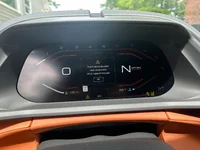
I tried driving without turning it off and it’s tolerable. However the speed limit warning is definitely a liability, not because it’s a nuisance, but because it’s completely inaccurate on a regular basis. As seen in the pic, looks like I’m driving dangerously slow!
I had the same experience with the ‘26 I drove - 105 popped up multiple times, almost like 105 was a default display when it got confused (which was frequent).
 
They are beyond annoying! If we could simply elect which ones we prefer to keep on/off, and have them stored, that would be ideal! I turn off the Fatigue Alert and Traffic Sign Recognition every time; those are by far the most annoying ones. The Traffic Lane assist can be a little annoying, also, but nothing anywhere near those first two.
 
They are beyond annoying! If we could simply elect which ones we prefer to keep on/off, and have them stored, that would be ideal! I turn off the Fatigue Alert and Traffic Sign Recognition every time; those are by far the most annoying ones. The Traffic Lane assist can be a little annoying, also, but nothing anywhere near those first two.
How often is fatigue alert? And what does it do?
 
How often is fatigue alert? And what does it do?
Happened nonstop when I was ripping through a canyon, it monitors where you are looking and dramatic changes in the car's direction.

Key Aspects of the Fatigue Alert System:
  • Monitors Driver Behavior: The system works by analyzing driving behavior, likely through steering wheel input sensors, to detect signs of inattentiveness or drowsiness.
  • Identifies Drowsiness Patterns: It identifies inconsistencies in driving, such as erratic steering corrections or minor drifting, often associated with fatigue.
  • Provides Alerts: When the system determines the driver is becoming tired, it issues a visual and/or audible warning in the instrument cluster to recommend taking a break.
  • Optimal Operation: It is designed to be particularly useful during monotonous driving conditions, such as long journeys on motorways.
 
Can anyone confirm if the AEB can be turned off? Don't see it anywhere in the screenshots.

Had an AEB event on a recent test drive that was truly dangerous.
 
Can anyone confirm if the AEB can be turned off? Don't see it anywhere in the screenshots.

Had an AEB event on a recent test drive that was truly dangerous.
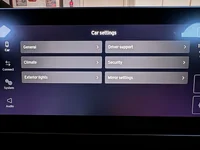
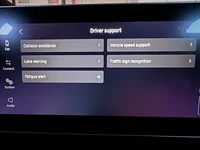
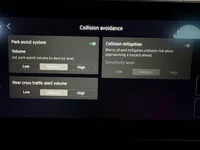
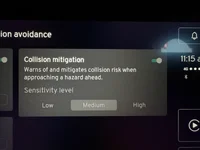
Yes it can - see attached pics
 

Attachments

  • IMG_2091.webp
    IMG_2091.webp
    56.1 KB · Views: 96
  • IMG_2092.webp
    IMG_2092.webp
    59.1 KB · Views: 113
  • IMG_2093.webp
    IMG_2093.webp
    73.3 KB · Views: 103
  • IMG_2094.webp
    IMG_2094.webp
    94.5 KB · Views: 122
Yes it can - see attached pics
Looks like you can only change the AEB setting to low and not turn it completely off?

And then to change/turn off sign recognition as well as speed warnings you have to go back and forth between menus and screens multiple times? Versus an array of these items on a single screen that you could tap the ones you want off (as appears to be the case on some other screenshots)? And it won't save the settings so you'd have to do it at startup each time?

Wow, this could be a deal killer. During my test drive, the dang thing would beep at you every time you went over the speed limit--insanity. Plus the very dangerous AEB event we had. If I had to go through so many menus each time to disable, would drive me crazy.
 
Looks like you can only change the AEB setting to low and not turn it completely off?

And then to change/turn off sign recognition as well as speed warnings you have to go back and forth between menus and screens multiple times? Versus an array of these items on a single screen that you could tap the ones you want off (as appears to be the case on some other screenshots)? And it won't save the settings so you'd have to do it at startup each time?

Wow, this could be a deal killer. During my test drive, the dang thing would beep at you every time you went over the speed limit--insanity. Plus the very dangerous AEB event we had. If I had to go through so many menus each time to disable, would drive me crazy.
You can turn it off, in the top right corner of the final picture! Yes though, multtiple selections each time that take a few moments....I have made it part of the car's warm-up period! It is annoying, though; hopefully, an update will come out to save settings.
 
You can turn it off, in the top right corner of the final picture! Yes though, multtiple selections each time that take a few moments....I have made it part of the car's warm-up period! It is annoying, though; hopefully, an update will come out to save settings.
Oh sorry--now I see it.

Yeah going back and forth through all those menus would drive me crazy. Hmm.
 
Oh sorry--now I see it.

Yeah going back and forth through all those menus would drive me crazy. Hmm.
It's all one touch of the top right to turn them off. I turn the Fatigue alert off on the main screen, then the traffic sign one, so it's really just the main menu, one touch there, then one selection and one touch there....I will test the Collision setting later today and see if it remembers anything....my guess is it will remember a setting but likely won't leave it off.
 
So you are tuening them off through the quick panel, right?
 

Create an account or login to comment

Join now to leave a comment enjoy browsing the site ad-free!

Create account

Create an account on our community. It's easy!

Log in

Already have an account? Log in here.

Back
Top