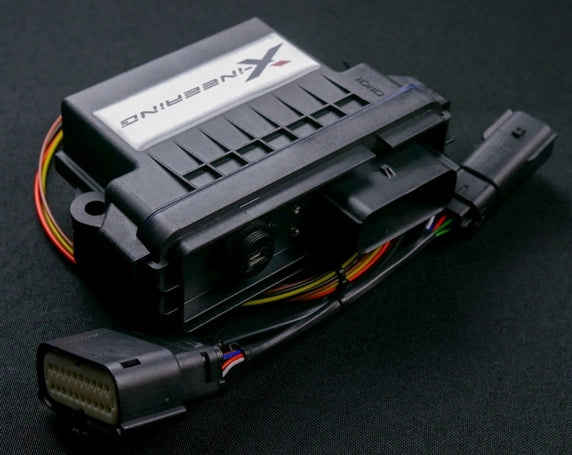
Xineering Downshift Blip Module Install / review

Just installed this, so few thoughts:

Connectors to disconnect brakes, clutch, accelerator was a pain in a butt for me. Tight space to work with. Highly recommend a hook tool. The connectors didn't want to come off, had to massage them which was annoying when laying face up in a tight space. Once removed, the actual installation is straight forward.

Initial thoughts: if you wanted this for daily, I wouldn't recommend it. Anytime you press the brake and the clutch together it'll blip, even when reversing. @NJemira85 did you change the default settings? Going to look around the settings as I think it blips a bit too long.

Too bad I'll be going out of the country for a bit, wanted to try it at the track but I'm leaning to just sticking with heel toeing.

I just mounted the on/off below the steering wheel rack and the module in the passenger console compartment.
On track it will be a real asset. Off track if you don’t like you can turn it off.

I don’t see a downside.

I haven’t fussed with the default setting. But I turn it off in traffic

It is not equivalent to oem implementations, but they are honest about that.

I’ve suggested they try to tie it into canbus/obdii to get full functionality. I think they may work on it.

The founder is great, anyone curious id suggest talking to him and @GRP
 
I plan to purchase the Xineering Downshift Blip Module and will likely have a shop install it since I'm no longer as agile to contort my body as I used to be.

I would really appreciate some photos showing the mounting of the disable switch as well as the module itself. Before I pay a shop to do this, I want to be explicit about where and how I want it mounted so that it is easily accessible to alter the timing if needed.
 
  • Like
Reactions: TFS
Just installed this as well. Cable tied all the wiring to existing wiring and out of the way of any of the pedals. Control unit stuck behind centre console with the on/off switch stuck to the side of the footwell and the usb cable in the storage tear near the transmission tunnel.

The website description indicates there is an Android app available but can't find a link to it anywhere? Don't have easy access to a PC laptop to do the programming.
 
Just installed this as well. Cable tied all the wiring to existing wiring and out of the way of any of the pedals. Control unit stuck behind centre console with the on/off switch stuck to the side of the footwell and the usb cable in the storage tear near the transmission tunnel.

The website description indicates there is an Android app available but can't find a link to it anywhere? Don't have easy access to a PC laptop to do the programming.
Do you have photos of how everything is setup?
 
Just installed this as well. Cable tied all the wiring to existing wiring and out of the way of any of the pedals. Control unit stuck behind centre console with the on/off switch stuck to the side of the footwell and the usb cable in the storage tear near the transmission tunnel.

The website description indicates there is an Android app available but can't find a link to it anywhere? Don't have easy access to a PC laptop to do the programming.
To my knowledge I dont think there is a downloadable app, its all done through USB connection. Ive always used a laptop.
 
Do you have photos of how everything is setup?
Pretty hard to take a photo tbh. It's already pain trying to wedge yourself and both arms into that cramped space let alone trying to get a camera to focus at such a short distance

To my knowledge I dont think there is a downloadable app, its all done through USB connection. Ive always used a laptop.
Ok, the manual and website indicate the USB cable can connected to an Android phone via USB OTG which would be far more convenient than connecting a laptop.
 
Just installed this, so few thoughts:

Connectors to disconnect brakes, clutch, accelerator was a pain in a butt for me. Tight space to work with. Highly recommend a hook tool. The connectors didn't want to come off, had to massage them which was annoying when laying face up in a tight space. Once removed, the actual installation is straight forward.

Initial thoughts: if you wanted this for daily, I wouldn't recommend it. Anytime you press the brake and the clutch together it'll blip, even when reversing. @NJemira85 did you change the default settings? Going to look around the settings as I think it blips a bit too long.

Too bad I'll be going out of the country for a bit, wanted to try it at the track but I'm leaning to just sticking with heel toeing.

I just mounted the on/off below the steering wheel rack and the module in the passenger console compartment.
Did you end up changing the settings? I agree the blip is a bit too much and is essentially over revving it for the downshift
 
I haven't used it after the initial install. Been mostly city driving when I do have the chance to drive the car.

Maybe this summer I'll have an opportunity at the track but honestly once you get used to the pedal placement, the emira has been the easiest to just heel and toe shift.
 
Did you end up changing the settings? I agree the blip is a bit too much and is essentially over revving it for the downshift

Just did a trackday at Bathurst with this and it works really well. The over rev does help to give you more time to downshift so you're not rushed and end up with a mis-shift. Even the driving instructor preferred to have this on vs heel-toe
 
(pls excuse any weird formatting, I dictated this via Siri)

Hi all,

This has been discussed a bit in another thread, but I felt it was worth creating a new one with the title of the product in the header so that people could find it more easily in the future.

I recently installed the Xineering Downshift Blip Module in my emira.
I purchased it from @GRP.
I called Max Darrah, the president of xineering, prior to the install to get any tips or tricks.
It’s an easy install but awkward. You need to lay upside down in the pedal box, staring up into the belly of the dash.
The instructions provided by xineering, which are 2 documents for lotus, together do a good job of explaining the process.
It’s 100% plug and play. Sort of like a piggyback for the pedals instead of the engine.
I have been using it for a day and I can say that it is absolutely fantastic for decelerating downshifts.
It’s important to understand that it only works when the brake pedal is being pressed at the same time as the clutch or immediately before the clutch.
This means that it is not a complete replacement for oem rev matching system like you might find on a caddy black wing or a recent Porsche.
During accelerating down shifts like you might execute when you’re in sixth gear and want to pass slower, traffic and downshift to fourth gear on the highway, the system is dormant.
The system comes with a switch to turn it on and off.
I see this as a no-brainer edition for every manual Emira. it is not very expensive. It installs very quickly. It is easily removed, and it is easily defeated with the provided switch.
I would love in the future, if there was a way for the company to add functionality on accelerating down shifts, perhaps by tapping into the OBDii port / canbus, either using the jb4’s connection or another obdii adapter.
From watching a few videos of their development process, it’s very clear that Max and his team at xineering are extremely focused and have elite attention to detail. They seem to have an iterative process where they continually refine their solution for each platform.
An example of this is the 3-D printed connector ends in the emira kit which fit flawlessly.
I’m sure people would love a demo video my wife and I will try to get one driving home today.

Happy to answer any questions, but have only had it in for a day so far.

 
I installed the Xingeering blip module today; a few observations:

1. Impossible to install without pick tools. It appears (based on the labeling under the dash) that the entire pedal box was factory installed as a preassembled unit with no regard to future access; this makes access to the connectors very, very difficult. After a few hours (and bloody hands from the various sharp metal edges and a sore neck from wedging under the dash), success!

2. I mounted the on /off switch by cutting a circular hole in the plastic trim to the right of, and underneath, the steering wheel.

3. I zip tied the control unit to two wire bundles under the glovebox. Stuffed the superfluous lengths of wire behind the passenger side toe plate. Can't see the LEDs, but that seemed like the best place to be out of the way.

4. After installation, I started the car and it immediately threw the check engine light and went into limp mode. Per the instructions, three quick drive cycles cleared it and all is working as advertised.

The Emira is my replacement for a Porsche GT4, which unfortunately was rear ended and totaled in November. This car had a rev matching function which was terrific and superior to this retrofit, so I have long term experience with this function. While the factory setup was superior to the after market module, I'm actually pretty happy with it. Its limitations have been discussed in detail in this and other threads, but it certainly works as advertised and is well worth the $620.

As an aside, the GT4 was a supremely polished blend of Porsche quality, engine, brakes (carbon ceramic), transmission and chassis. The engine to a degree, and in particular the manual transmission, was unparalleled, and the Emira is not in the same ballpark. HOWEVER, the build quality of the Emira is surprisingly great and exceeds my expectations, and the Lotus chassis and mechanical steering are superior. Pure fun!

The only issue I've had (like everyone it seems) is the wonky infotainment system. I had car at the dealer for my first and only oil change at break-in ($710!!!!), and they performed a software update which took nearly two full days. They were good enough to Uber me home and back (75 miles) at least.

I had a couple of minor glitches with car play on the way home, so I'm not sure all the bugs are worked out yet.
 
I installed the Xingeering blip module today; a few observations:

1. Impossible to install without pick tools. It appears (based on the labeling under the dash) that the entire pedal box was factory installed as a preassembled unit with no regard to future access; this makes access to the connectors very, very difficult. After a few hours (and bloody hands from the various sharp metal edges and a sore neck from wedging under the dash), success!

2. I mounted the on /off switch by cutting a circular hole in the plastic trim to the right of, and underneath, the steering wheel.

3. I zip tied the control unit to two wire bundles under the glovebox. Stuffed the superfluous lengths of wire behind the passenger side toe plate. Can't see the LEDs, but that seemed like the best place to be out of the way.

4. After installation, I started the car and it immediately threw the check engine light and went into limp mode. Per the instructions, three quick drive cycles cleared it and all is working as advertised.

The Emira is my replacement for a Porsche GT4, which unfortunately was rear ended and totaled in November. This car had a rev matching function which was terrific and superior to this retrofit, so I have long term experience with this function. While the factory setup was superior to the after market module, I'm actually pretty happy with it. Its limitations have been discussed in detail in this and other threads, but it certainly works as advertised and is well worth the $620.

As an aside, the GT4 was a supremely polished blend of Porsche quality, engine, brakes (carbon ceramic), transmission and chassis. The engine to a degree, and in particular the manual transmission, was unparalleled, and the Emira is not in the same ballpark. HOWEVER, the build quality of the Emira is surprisingly great and exceeds my expectations, and the Lotus chassis and mechanical steering are superior. Pure fun!

The only issue I've had (like everyone it seems) is the wonky infotainment system. I had car at the dealer for my first and only oil change at break-in ($710!!!!), and they performed a software update which took nearly two full days. They were good enough to Uber me home and back (75 miles) at least.

I had a couple of minor glitches with car play on the way home, so I'm not sure all the bugs are worked out yet.
Thanks for the write up
 
Did you end up changing the settings? I agree the blip is a bit too much and is essentially over revving it for the downshift
I installed it last week, and finally got around to adjusting the settings last night. Not sure if others had the same experience, but the default settings were over-revving most of my downshifts by several hundred RPM.

Ended up landing on 60% throttle for 120ms, down from the default 70%/200ms. Feels a lot closer to the OEM rev matching I'm used to from my previous F87 M2C.
 
I did not make any adjustments. I had a track session yesterday and was mostly satisfied with the performance when I shift correctly. My track experience is mostly in 370Zs with rev match which senses the gear position. So if I delay my shift after depressing clutch, it doesn't blip until gear change is detected. I wasn't really aware of this delay until I started driving the Emira; but it will undoubtedly force me to improve my shifts.
 
I installed it last week, and finally got around to adjusting the settings last night. Not sure if others had the same experience, but the default settings were over-revving most of my downshifts by several hundred RPM.

Ended up landing on 60% throttle for 120ms, down from the default 70%/200ms. Feels a lot closer to the OEM rev matching I'm used to from my previous F87 M2C.
I also made the same setting adjustments - 60%/120 ms. I agree that's much closer to where it should be. Anyone else with views on alternative adjustments?
 
Tried to make the adjustments but my laptop just wouldn't detect the module. This is on a Surface Pro 8 with a usb-c dock.

1785975095906.webp


I could try the Android app but that looks even more outdated and is almost a command-line interface
 
I did the install today - I'm a big guy - getting under the dash was a chore. I could only get one hand in there to do any work laying flat on my back straddling over the door sill. My shoulders wouldn't let me get the other hand underneath. Took me about 45 min total - I ran the wires through the hole directly above and behind the opening in the center console area where the usb c plug is and coiled the wires and placed the module in the netting on the passenger footwell. Not permanent, but good enough for now. I'll likely reroute the cables and install the module in the area behind the glove box, though I havent figured out how to remove it.

I suggest looking very hard at the pnp wiring harnesses provided to get a good feel for how the oem plugs work. I did not need tools, just patience. I couldnt really use tools because I could only access the area with one hand. Someone slim and slight would have a MUCH easier time of it.

I was super diligent about having the car completely off whilst installing, but still had the check engine light afterward. The codes were all accelerator position sensor related. Instead of drive cycling I just used my OBDLink MX+ and the native iOS app to clear the codes. Be aware it creates some permanent CEL codes that stay in memory even after clearing that the dealer could probably see.

I left it at the stock setting (70% throttle blip, 200ms length, no delay) - when in track mode it essentially floors the throttle - it was WAY too aggressive. I finally settled on the car in track mode - 50% throttle blip, 250ms, and 200ms delay to match my shifting style. One of the main take homes is not to release the clutch too quickly on the downshift even when you think the blip is receding.

Of note - the different driving modes DO change the oem accelerator pedal profile - so the Blip Shift module adds on top of that. So in regular mode 50% isn't much of a blip, in sport its a bit better, but in track is just right imho (my comparison is a 991.2 GT3 manual that I previously owned with remarkably good rev matching downshifts).

Also of note, you MUST brake first then clutch in order for the blip to fire. If you clutch at all first then brake it will not blip. There is no setting to adjust this sadly. But, it does allow you to leave it on for daily driving as long as you clutch first before braking.

I have an HPDE tomorrow - I will report back any insights - I am pretty much physically unable to heel toe shift, and and dont have the knack for sidestepping the throttle from the accelerator, so hopefully it works well.

Edit -
I got the X-ineering Blip Shift module, and several other track related parts from GRP and they were FANTASTIC about shipping them quickly and getting them to me in time for the weekend track day.
 
Last edited:
I did the install today - I'm a big guy - getting under the dash was a chore. I could only get one hand in there to do any work laying flat on my back straddling over the door sill. My shoulders wouldn't let me get the other hand underneath. Took me about 45 min total - I ran the wires through the hole directly above and behind the opening in the center console area where the usb c plug is and coiled the wires and placed the module in the netting on the passenger footwell. Not permanent, but good enough for now. I'll likely reroute the cables and install the module in the area behind the glove box, though I havent figured out how to remove it.

I suggest looking very hard at the pnp wiring harnesses provided to get a good feel for how the oem plugs work. I did not need tools, just patience. I couldnt really use tools because I could only access the area with one hand. Someone slim and slight would have a MUCH easier time of it.

I was super diligent about having the car completely off whilst installing, but still had the check engine light afterward. The codes were all accelerator position sensor related. Instead of drive cycling I just used my OBDLink MX+ and the native iOS app to clear the codes. Be aware it creates some permanent CEL codes that stay in memory even after clearing that the dealer could probably see.

I left it at the stock setting (70% throttle blip, 200ms length, no delay) - when in track mode it essentially floors the throttle - it was WAY too aggressive. I finally settled on the car in track mode - 50% throttle blip, 250ms, and 200ms delay to match my shifting style. One of the main take homes is not to release the clutch too quickly on the downshift even when you think the blip is receding.

Of note - the different driving modes DO change the oem accelerator pedal profile - so the Blip Shift module adds on top of that. So in regular mode 50% isn't much of a blip, in sport its a bit better, but in track is just right imho (my comparison is a 991.2 GT3 manual that I previously owned with remarkably good rev matching downshifts).

Also of note, you MUST brake first then clutch in order for the blip to fire. If you clutch at all first then brake it will not blip. There is no setting to adjust this sadly. But, it does allow you to leave it on for daily driving as long as you clutch first before braking.

I have an HPDE tomorrow - I will report back any insights - I am pretty much physically unable to heel toe shift, and and dont have the knack for sidestepping the throttle from the accelerator, so hopefully it works well.
Good info, thank you for sharing!

There is also a decent size flat aluminum area at the base of the steering column the box can be mounted to with VHB tape or heavy duty Velcro.
 
Good info, thank you for sharing!

There is also a decent size flat aluminum area at the base of the steering column the box can be mounted to with VHB tape or heavy duty Velcro.
Thanks guys, for shipping out my stuff so quickly. Much appreciated.
 

Create an account or login to comment

Join now to leave a comment enjoy browsing the site ad-free!

Create account

Create an account on our community. It's easy!

Log in

Already have an account? Log in here.

Supporting Vendors View all →

Latest posts

Back
Top